A good scheduled maintenance announcement tells people four things: what is changing, when, what they will notice, and where to get updates. Below are copy-paste templates for email, your status page, in-app banners and social posts, plus a timeline for when to send each one.
What to include in a maintenance announcement
- What: one plain sentence about the work, such as “database upgrade” or “moving to a new data center”. Skip internal jargon.
- When: start time, expected end time and time zone. “Saturday, 14 November, 02:00–04:00 UTC (Friday 6–8 PM PT)”.
- Impact: what users will notice. Full downtime, read-only mode, slower responses, or no visible impact.
- Who is affected: which product, region, API or plan. Name the components on your status page.
- What to do: anything users should do before or during the window, or “no action needed”.
- Where to follow: a link to your status page and how to subscribe.
When to announce scheduled maintenance
| When | What to send | Channels |
|---|---|---|
| 7–14 days before | First announcement | Status page, email to subscribers, in-app banner for major work |
| 24 hours before | Reminder | Status page update, email, in-app banner |
| At start | “Maintenance in progress” | Status page, Slack/webhook, social |
| During (if it runs long) | Progress or extension update | Status page, email if the end time changes |
| At finish | “Maintenance completed” | Status page, email, social |
Scheduled maintenance announcement templates
Replace the parts in [brackets]. Each template works on its own, so you can use only the ones you need.
Email: first announcement
Email · 7–14 days before
Subject: Scheduled maintenance on [date] – [product] [unavailable / read-only] for up to [duration]
Hi [name],
We’ll be carrying out scheduled maintenance on [product] to [one-line reason, e.g. upgrade our database for faster performance].
When: [day, date], [start]–[end] UTC ([local time zone])
What you’ll notice: [e.g. the dashboard and API will be unavailable for up to 30 minutes]. [Data / scheduled jobs / integrations] will not be affected.
What you need to do: [nothing / action and deadline].
We’ll post live updates on our status page: [status page URL]. You can subscribe there for email, Slack or webhook notifications.
Thanks for your patience,
[Team name]
Email: 24-hour reminder
Email · 24 hours before
Subject: Reminder: [product] maintenance tomorrow, [start]–[end] UTC
Hi [name],
A quick reminder that scheduled maintenance starts tomorrow at [start] UTC ([local time]) and should take about [duration].
During this window [impact]. Nothing has changed since our last message.
Follow along at [status page URL].
[Team name]
Status page: scheduled maintenance post
Status page · scheduled
Title: Scheduled database maintenance
We will be performing scheduled maintenance on [component] on [date] from [start] to [end] UTC. During this time [impact]. No action is required. We’ll update this page when the work starts and when it’s complete.
Status page: in progress, extended and completed
Status page · in progress
Scheduled maintenance is now in progress. [Component] is [unavailable / in read-only mode]. We expect to finish by [end] UTC.
Status page · extended
The maintenance is taking longer than planned because [short reason]. We now expect to finish by [new end time] UTC. [Impact] continues until then. Sorry for the delay; next update by [time].
Status page · completed
Maintenance is complete and [component] is fully operational. If you notice anything unusual, contact us at [support email]. Thanks for your patience.
In-app or website banner
Banner · before
Scheduled maintenance on [date], [start]–[end] UTC. [Product] will be [unavailable / read-only]. Details →
Maintenance page · during
We’re upgrading [product] and will be back by [end time] UTC. Follow live updates at [status page URL].
Social post (X, LinkedIn)
Social · before
Heads up: scheduled maintenance on [date], [start]–[end] UTC. [Product] will be [impact] during this window. Live updates: [status page URL]
Social · completed
✅ Scheduled maintenance is complete and everything is running normally. Thanks for bearing with us.
Internal message (Slack or Teams)
Internal · team channel
Maintenance window: [date], [start]–[end] UTC. Owner: [name]. Customer impact: [impact]. Rollback plan: [link]. Support macro for tickets: [link]. Status page post: [link].
Scheduled maintenance announcement examples: dos and don’ts
| Don’t write | Write instead |
|---|---|
| “Brief downtime this weekend.” | “The dashboard will be unavailable on Saturday, 14 November, 02:00–02:30 UTC.” |
| “We’re migrating the primary RDS cluster to Aurora.” | “We’re upgrading our database to make the app faster.” |
| “Some users may experience issues.” | “EU customers won’t be able to log in. US customers aren’t affected.” |
| “Maintenance tonight 2–4.” | “02:00–04:00 UTC (6–8 PM PT on Friday).” |
| Silence when the work runs over | “Running longer than planned; new end time 05:00 UTC. Next update at 04:30.” |
Scheduled maintenance checklist
- Pick a low-traffic window using your analytics, and check it against customer time zones and known events.
- Write down the impact, the expected end time and a rollback plan.
- Post the maintenance on your status page and notify subscribers 7–14 days ahead.
- Brief support and sales so they can answer questions.
- Send a reminder 24 hours before.
- Post when the work starts. Turn on your maintenance page if the app will be down.
- Update every 30–60 minutes if the window is extended.
- Post “completed”, remove banners and maintenance pages, and confirm your monitoring is green.
- For major work, share a short summary of what changed.
Announce scheduled maintenance with Statusentry
Statusentry has scheduled maintenance built in, so the announcement, reminders and completion message all come from one place.
- Schedule maintenance with a start and end time and the affected services. It appears under Future Maintenance on your public status page.
- Subscribers are notified when you schedule it, and Statusentry sends another notification when the window starts.
- When the window starts, an incident with “Maintenance” impact is created automatically so you can post progress updates. For urgent unplanned work, create an incident with maintenance impact directly.
- Mark it resolved and the completion notice goes out to your channels.
- Mark maintenance as internal to notify only your team, without posting it publicly.
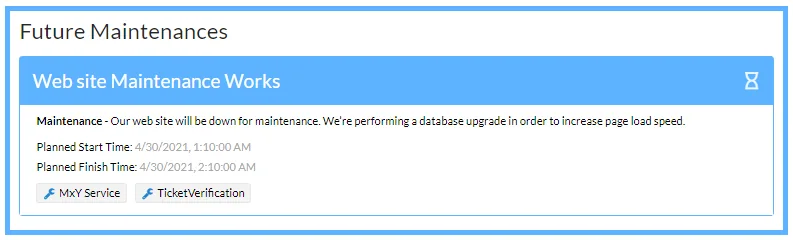
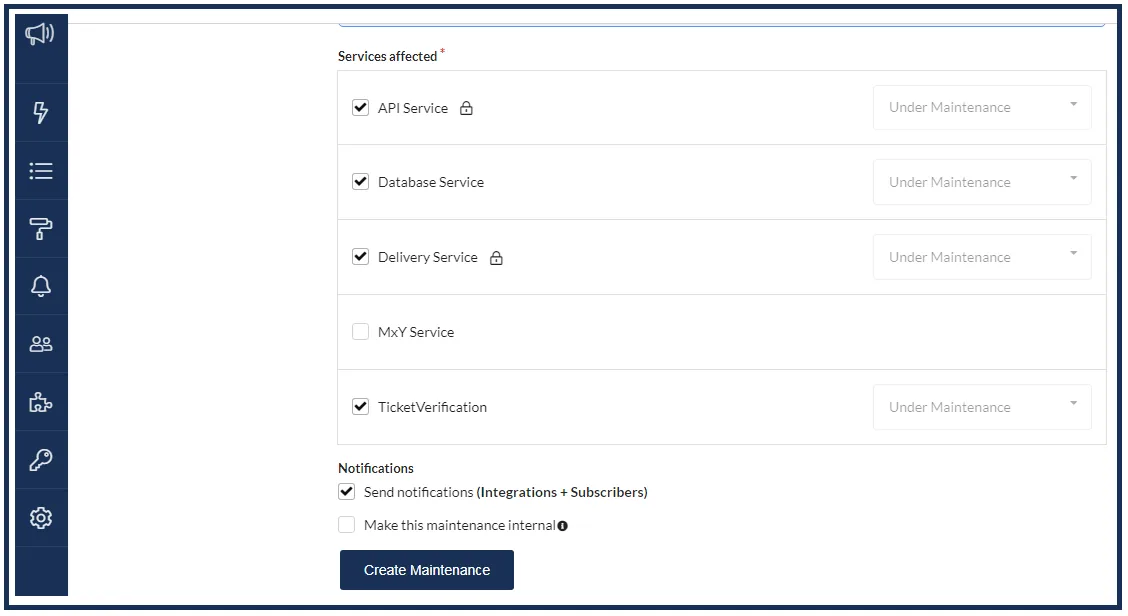
Subscribers can be notified by email, Slack and webhook, and updates can be posted to X automatically. See plans and pricing, the maintenance docs, or view the demo status page.