A status page API lets you open incidents, post updates and schedule maintenance from your own code: a deploy script, a monitoring alert or a Slack bot. This guide explains the two kinds of status page API, how Atlassian Statuspage's API works, and how to automate your status page with the Statusentry REST API, with working request examples.
What is a status page API?
Most status page tools offer two different APIs, and search results often mix them up:
- A management API (authenticated, read/write). Your systems use it to create incidents, post incident updates, change component status and schedule maintenance. This is what you automate against.
- A public status API (read-only). Other people use it to read your page's current status as JSON, for example to show a banner in your app or to aggregate the status of vendors you depend on.
If you are searching for the “Statuspage API” to automate your own page, you want the management API. If you want to read another company's status, you want their public status API.
The Atlassian Statuspage API at a glance
Atlassian Statuspage documents its management API at developer.statuspage.io. The essentials:
| Atlassian Statuspage | |
|---|---|
| Base URL | https://api.statuspage.io/v1/ |
| Authentication | API key in the header: Authorization: OAuth <api-key> (or an api_key query parameter) |
| Rate limit | 1 request per second per API token, measured over a 60-second window; 420 or 429 when exceeded |
| Key permissions | Full read/write keys; no read-only keys |
| Main resources | Pages, components and groups, incidents and updates, scheduled maintenance, subscribers, metrics, templates, users |
| Public status API | Every page also exposes read-only JSON such as /api/v2/summary.json and /api/v2/status.json |
The Statuspage API is broad, which is useful if you manage subscribers or metrics in code. Many teams only need three things from it, though: open an incident, post updates until it is resolved, and schedule maintenance. That is exactly what the Statusentry API covers.
The Statusentry REST API
Statusentry is a hosted status page with a REST API for incidents and scheduled maintenance. The API is included on every paid plan, starting with Start Up at $9.99/month (see pricing). All endpoints live under https://api.statusentry.com/v1/.
| Resource | Endpoints | What you can do |
|---|---|---|
| Incidents | GET/POST /v1/incidents, GET/DELETE /v1/incidents/:id | List, get, create and delete incidents with a status and impact |
| Incident updates (entries) | GET/POST /v1/incidents/:id/entries, GET/PUT/DELETE /v1/incidents/:id/entries/:entryId | Post an update, set the incident status, mark components degraded, choose whether subscribers are notified |
| Scheduled maintenance | GET/POST /v1/maintenances, GET/PUT/DELETE /v1/maintenances/:id | Announce a maintenance window with affected components, as public or internal-only |
Incident status follows the usual lifecycle: investigating, identified, monitoring and resolved. Impact is none, minor, major or critical. Component status is operational, degraded_performance, partial_outage, major_outage or under_maintenance. Those are the same values Statuspage uses, so existing scripts map over easily.
Create API keys
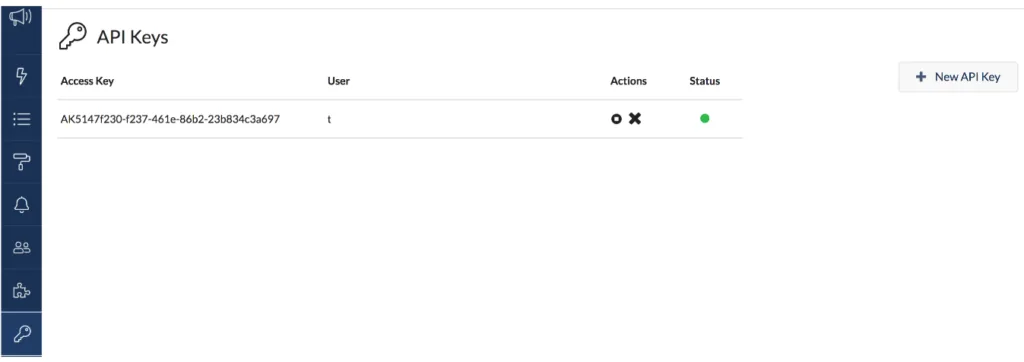
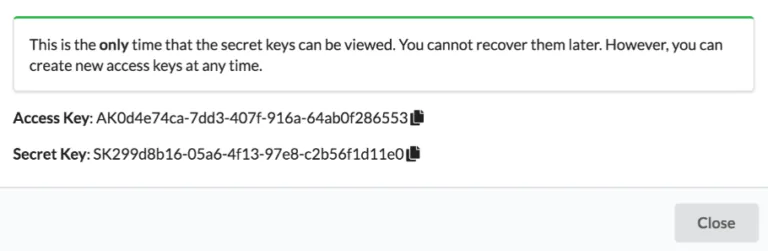
Create a key pair under API keys in the Statusentry admin panel. You get an access key and a secret key. The secret key is shown only once, so store it in your secret manager straight away.
Authenticate requests
Statusentry never sends your secret key over the wire. Instead, each request carries a short-lived JWT signed with it (HS256), with your access key as the issuer and www.statusentry.com as the audience. The Authorization header looks like this:
Header format
Authorization: StatusEntry <ACCESS_KEY>:<SIGNED_JWT>Most languages have a JWT library (jwt.io lists them). A minimal Python helper using PyJWT:
Python
import time
import jwt  # pip install pyjwt requests
import requests

ACCESS_KEY = "AK..."   # from the admin panel
SECRET_KEY = "SK..."   # keep this in a secret manager
API = "https://api.statusentry.com/v1"

def headers():
    now = int(time.time())
    token = jwt.encode(
        {"iss": ACCESS_KEY, "aud": "www.statusentry.com", "iat": now, "exp": now + 300},
        SECRET_KEY,
        algorithm="HS256",
    )
    return {"Authorization": f"StatusEntry {ACCESS_KEY}:{token}",
            "Content-Type": "application/json"}
See how to authenticate with API key pairs in the docs for a Java example.
Example: open an incident
Create the incident and its first update in one request. Timestamps are epoch milliseconds. Set sendNotification to false if you want to post silently while you confirm the problem.
Python
import time
now_ms = int(time.time() * 1000)

incident = requests.post(f"{API}/incidents", headers=headers(), json={
    "name": "Signup page is having intermittent errors",
    "incidentStatus": "investigating",
    "incidentImpact": "minor",
    "entry": {
        "message": "We are investigating errors on the signup page. "
                   "Next update within 30 minutes.",
        "date": now_ms,
        "incidentStatus": "investigating",
        "affectedComponents": [
            {"componentId": "<COMPONENT_ID>", "componentStatus": "degraded_performance"}
        ],
        "sendNotification": True,
    },
}).json()

incident_id = incident["id"]
Example: post updates and resolve
Each update is an entry on the incident with its own status, so posting an entry with resolved closes the incident. Subscribers are notified by email, Slack and webhook unless you set sendNotification to false.
Python
requests.post(f"{API}/incidents/{incident_id}/entries", headers=headers(), json={
    "message": "The issue is resolved. Signups are working normally again.",
    "date": int(time.time() * 1000),
    "incidentStatus": "resolved",
    "affectedComponents": [
        {"componentId": "<COMPONENT_ID>", "componentStatus": "operational"}
    ],
    "sendNotification": True,
})
Example: schedule maintenance from a deploy pipeline
Announce a maintenance window when a risky migration is scheduled, so customers see it on the status page and subscribers get notice in advance. Set internal to true to notify only your own integration channels.
Python
start = int(time.time() * 1000) + 24 * 3600 * 1000   # tomorrow
requests.post(f"{API}/maintenances", headers=headers(), json={
    "name": "Database upgrade",
    "message": "We will upgrade our primary database. "
               "The dashboard may be read-only for up to 15 minutes.",
    "plannedStartTime": start,
    "plannedEndTime": start + 30 * 60 * 1000,
    "affectedComponents": ["<COMPONENT_ID>"],
    "sendNotification": True,
    "internal": False,
})
For wording, see our scheduled maintenance announcement templates.
Automation ideas
- Slack slash command: one command opens the incident, creates the video call and posts the first status page update, so nobody leaves Slack during an outage.
- Monitoring alert to incident: when your alerting tool fires, open an investigating incident with notifications off; a human confirms and publishes. Paid plans also include built-in endpoint monitoring that alerts your team when a URL fails.
- CI/CD maintenance windows: create the maintenance from the same pipeline job that schedules a migration, and close it when the job finishes.
- Consistent wording: keep message text in incident communication templates and fill them in from your scripts.
Moving from the Statuspage API to Statusentry
If you already automate Atlassian Statuspage, most calls translate one to one:
| Atlassian Statuspage API | Statusentry API |
|---|---|
| POST /v1/pages/{page_id}/incidents | POST /v1/incidents |
| PATCH an incident with a new status and body | POST /v1/incidents/:id/entries |
| Scheduled incidents (maintenance) | POST /v1/maintenances |
| components object with component status | affectedComponents with componentId and componentStatus |
| deliver_notifications | sendNotification |
| Authorization: OAuth <key> | Authorization: StatusEntry <access key>:<signed JWT> |
There is no page ID in Statusentry paths: the key pair already identifies your status page.
Get started
Create a free account (every new account gets a 30-day Enterprise trial, no credit card), add your components, generate an API key pair and send your first request. The full reference is in the Statusentry API documentation, and you can see what a finished page looks like on the demo status page.